Need for Speed AI Video Generator
Upload one photo of your car and get three different chase clips: a street burnout, a highway pursuit and a night getaway. Same car, three scenes, 8 or 14 seconds each.
Create your clips
1Your car photo
A clean side or three-quarter view works best. Fill the frame with the car, keep the whole vehicle visible, and avoid heavy shadows or motion blur.
2The three clips
 Street BurnoutDusk, an empty lot, smoke pouring off the rear tyres.
 Highway PursuitGolden hour, coastal road, a low chase camera.
 Night GetawayWet neon streets, one long drift around the corner.
3Length
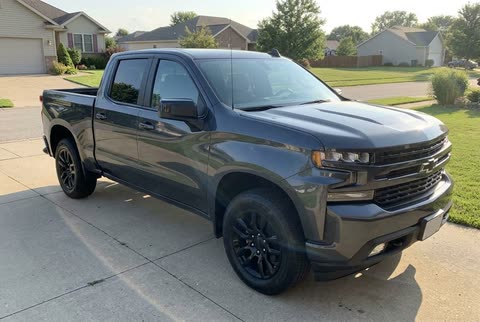
Demo clips are AI-generated for this preview; your own car replaces the hero car.
The catch
Filming a chase scene yourself is not a one-photo job
You need a location and a permit
An empty lot, a closed road or a wet street at night — and someone who will let you film there.
You need a second car and a camera car
Tracking shots at speed take a rig, a driver and a closed road, not a phone on a tripod.
You need the edit to sell it
Cutting three different scenes to a beat, grading them and adding sound is a day of editing, not a filter.
Side by side
Filming it vs. using Need for Speed AI
| Doing it yourself | With Need for Speed AI |
|---|---|
| Find a location and get permission | One photo of your car |
| Book a camera car and a driver | Three scenes generated from the same photo |
| Cut, grade and add sound | Three finished 16:9 MP4s |
| Spend a day on one clip | Ready in the background, usually minutes |
How it works
How to make a Need for Speed AI video in 3 steps
- 1
Upload one car photo
A clean side or three-quarter shot, whole car in frame, JPG, PNG or WebP up to 10 MB.
- 2
Confirm it is yours to use
Tick the box: it is your vehicle or you have permission, and there are no faces or plates you cannot use.
- 3
Get three clips
Pick 8 or 14 seconds. The three scenes render in the background; download each MP4 from My videos.
Made with Need for Speed AI
One photo in, three scenes out
No shoot, no location permit, no second car. Upload one clean photo of your car and the render puts the same vehicle into a burnout, a highway pursuit and a night chase, with the paint, wheels and body kit kept consistent across all three.
Street Burnout · Dusk, an empty lot, smoke pouring off the rear tyres.
Finished clip
Highway Pursuit · Golden hour, coastal road, a low chase camera.
Finished clip
Night Getaway · Wet neon streets, one long drift around the corner.
Finished clip
About the trend
What is Need for Speed AI?
Need for Speed AI is the name people give to the short, cinematic car-chase clips filling TikTok and Reels: an ordinary car — a pickup, a hatchback, a daily driver — suddenly doing a burnout or a drift through a movie-style chase. The joke is the contrast between the car you actually own and the film budget around it.
The trend started with the Need for Speed chase format: about thirty seconds, a dozen quick cuts, tyre smoke, a low camera and a hard cut on the beat. Most people cannot film it, because it needs a closed road, a camera car and a second driver. Need for Speed AI rebuilds the format from a single still photo instead.
That is why you will also see it searched as Need for Speed Video, Need for Speed AI video or a car chase AI video. They all describe the same thing: one photo of your car, turned into a chase scene you can post. If you are looking for an AI car video from photo rather than a template edit, this is the same idea — and a car video generator that keeps your own paint, wheels and body kit across every shot.
Read the full Need for Speed AI trend guideAt a glance
Need for Speed AI specs
- Input
- One car photo, JPG, PNG, WebP up to 10 MB
- Output
- Three different scenes per generation: Street Burnout, Highway Pursuit, Night Getaway
- Video length
- 8 or 14 seconds per clip
- Format
- 16:9 MP4, 720p
- Price
- $7.99 for three 8s clips · $14.99 for three 14s clips
- Credits
- Never expire, no subscription
- Render time
- Runs in the background; you can leave the page
- Failed renders
- Credits refunded automatically
Features
Everything you need for a Need for Speed AI chase
Your car, kept consistent
The prompt locks body shape, paint, wheels, lights and trim so the same vehicle appears in every shot.
Three scenes, not three crops
A burnout, a highway pursuit and a night getaway — three separate renders, not one clip cut three ways.
16:9 and ready to post
A landscape MP4 that drops into TikTok, Reels, Shorts or a YouTube short without another edit.
Renders in the background
Start the set and leave the page. Finished clips wait in My videos.
Private by default
Uploads are stored privately, used only for your render and deleted automatically 7 days after upload.
Fair billing
Credits never expire. If a render fails, the credits go straight back to your balance.
Ideas
What people make with it
The daily driver, movie budget
Put the car you actually own into a chase scene and send it to the group chat.
Try it with your car photoA dealership listing that moves
Turn a still from the lot into three short clips for a listing, a reel or a story.
Try it with your car photoA creator post without a shoot
Ride the trend without a closed road, a camera car or a second driver.
Try it with your car photoPricing
One photo, three clips, one price
$7.99 for three 8-second clips, $14.99 for three 14-second clips. No subscription, no expiry.
Three 8s clips
One photo, three scenes
$7.99
300 credits
One 8-second set · 3 clips
- Credits never expire
- Three different scenes per set
- 16:9 MP4 downloads
- Automatic refund on failed renders
Three 14s clips
The longer cut of all three scenes
$14.99
600 credits
One 14-second set · 3 clips
- Credits never expire
- Three different scenes per set
- 16:9 MP4 downloads
- Automatic refund on failed renders
Two 14s sets
Six clips for regular posting
$27.99
1200 credits
Two 14-second sets · 6 clips
- Credits never expire
- Three different scenes per set
- 16:9 MP4 downloads
- Automatic refund on failed renders
Prices in USD. Taxes are calculated at checkout by our payment partner.
Questions, answered
Still unsure? Write to us and a person will reply within one business day.
Contact supportWhat is Need for Speed AI?
Need for Speed AI turns one photo of your car into three short cinematic chase clips: a street burnout, a highway pursuit and a night getaway. It is an independent tool, not a game or a film studio.
Where the Need for Speed AI trend comes fromWhich photo works best?
A clean side or three-quarter shot of the whole car, in even light, with the wheels and front end visible. Avoid heavy shadows, motion blur, tight crops and photos with people in the foreground.
Photo tips for a better Need for Speed AI videoHow long does a render take?
All three clips render in the background, so you do not have to wait on the page. You can close the tab; finished clips appear in My videos, usually within a few minutes.
How do credits work?
100 credits buy one 8-second clip, so a set of three costs 300. Credits are bought in packs, never expire and are refunded automatically if a render fails.
Can I use a photo of someone else’s car?
Only with the owner’s permission. Do not upload photos with number plates or people you do not have permission to use. Content that breaks this rule is removed and the account may be closed.
What happens to my photo and clips?
Your photo is deleted automatically 7 days after upload. Finished clips are kept for 30 days after they finish. Deleting your account removes your files right away.
Is this affiliated with the Need for Speed games?
Need for Speed AI is an independent product. It is not affiliated with Electronic Arts, the Need for Speed game series or any film studio, and every clip is AI-generated rather than real footage.
Your car’s chase scene is one photo away
Upload one clean photo and get three 16:9 clips: burnout, highway and night.
Create my clips · $7.99+